How DayOf works.
For the client dinners and experiences you host.
Make the booking.
Your event lead picks a package from the catalog with details, all-in pricing, and headcount in view, and books with a deposit.
- Choose the experience that fits your goal, whether you're prospecting, nurturing, or closing.
- DayOf confirms availability and specific pricing within 48 hours and holds your booking.
- Finalize headcount and payment one week before the event.
Never waste time sourcing or negotiating.
Get the word out.
Start inviting your target customers as soon as the event is created. You own the guest list from the first invite to the final headcount.
- Your team chooses who to invite straight from your CRM with each person's deal data attached.
- Invites go out by email or text, with reminder sequences aimed at your reps or sent directly to invitees.
- DayOf generates a personalized event landing page for each invitee and tracks every open and page view.
Fill the room with the right people.
Hi {{first}}, I'm hosting a small dinner during the conference and would love for you to join us. Good food, good people, no slides.
Hi Dana, I'm hosting a small dinner during the conference and would love for you to join us.
View the invitationTake notes by text.
Your reps work the room and text notes to a dedicated number as the event happens.
- See who is in the room and which accounts they represent.
- Your reps text notes to a dedicated number during the event. No app to open and no form to fill.
- DayOf matches every note to the right invitee and creates the follow-ups.
No need to remember to enter them the next morning.
Measure what matters.
An event report is automatically built in real time, outlining who came, what happened, and the revenue opportunities created.
- The report shows the full attendee funnel and the revenue opportunity the event provided.
- Every note your reps captured is in the report, matched to the account it came from.
- Follow-ups are created automatically. Reps get a reminder the next day, or DayOf pushes them straight to your CRM.
Immediately see your return on event.
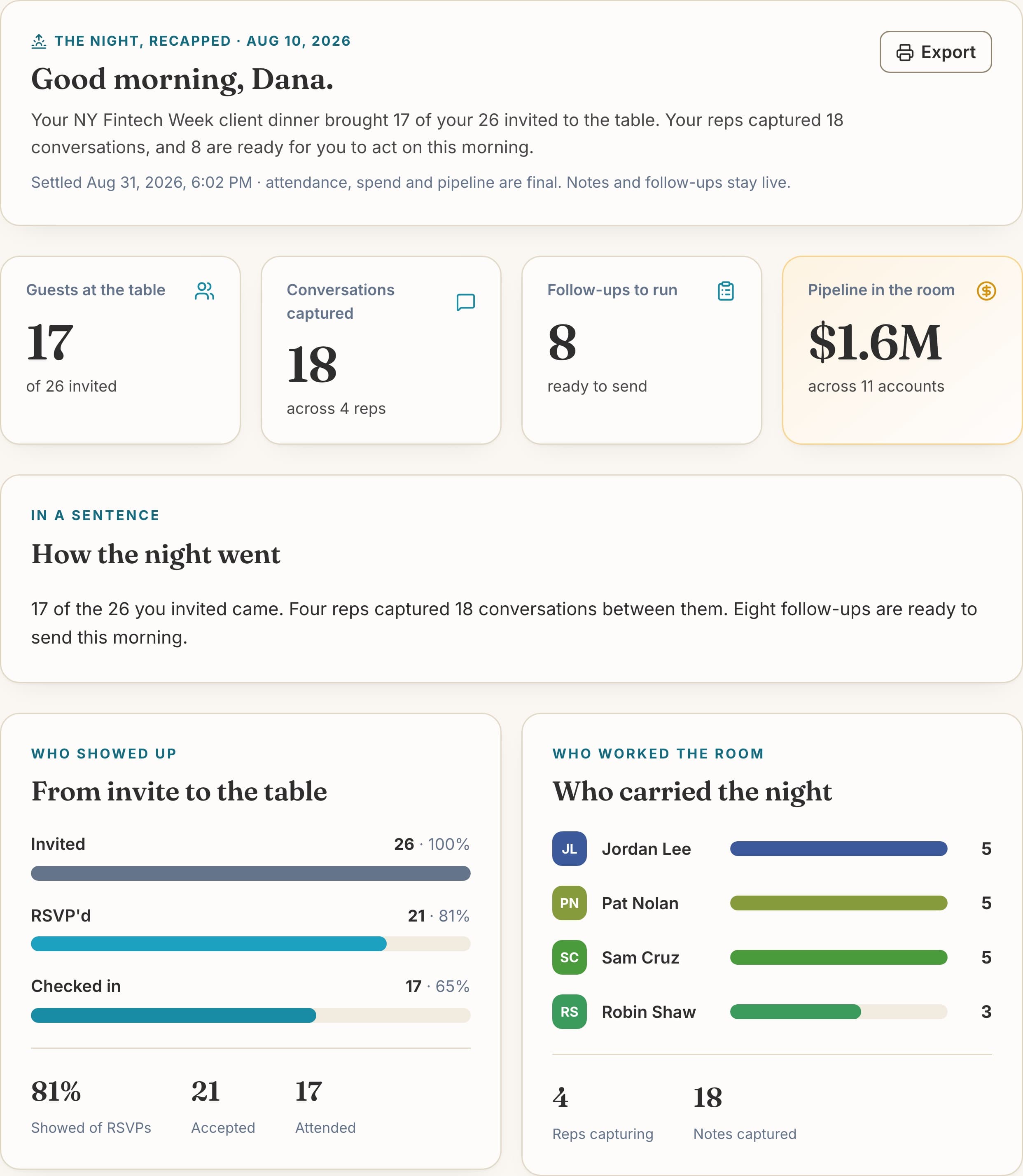
You pick the experience and host the event. DayOf handles everything in between.
Who came, who spoke with whom, and the pipeline the event created. It starts building the moment your invites go out.
Through the portal or a Claude connector.
Every event, guest list, and report is in the portal. Your team can also work from a Claude conversation.
More integrations on the way.
Everything in one spot.
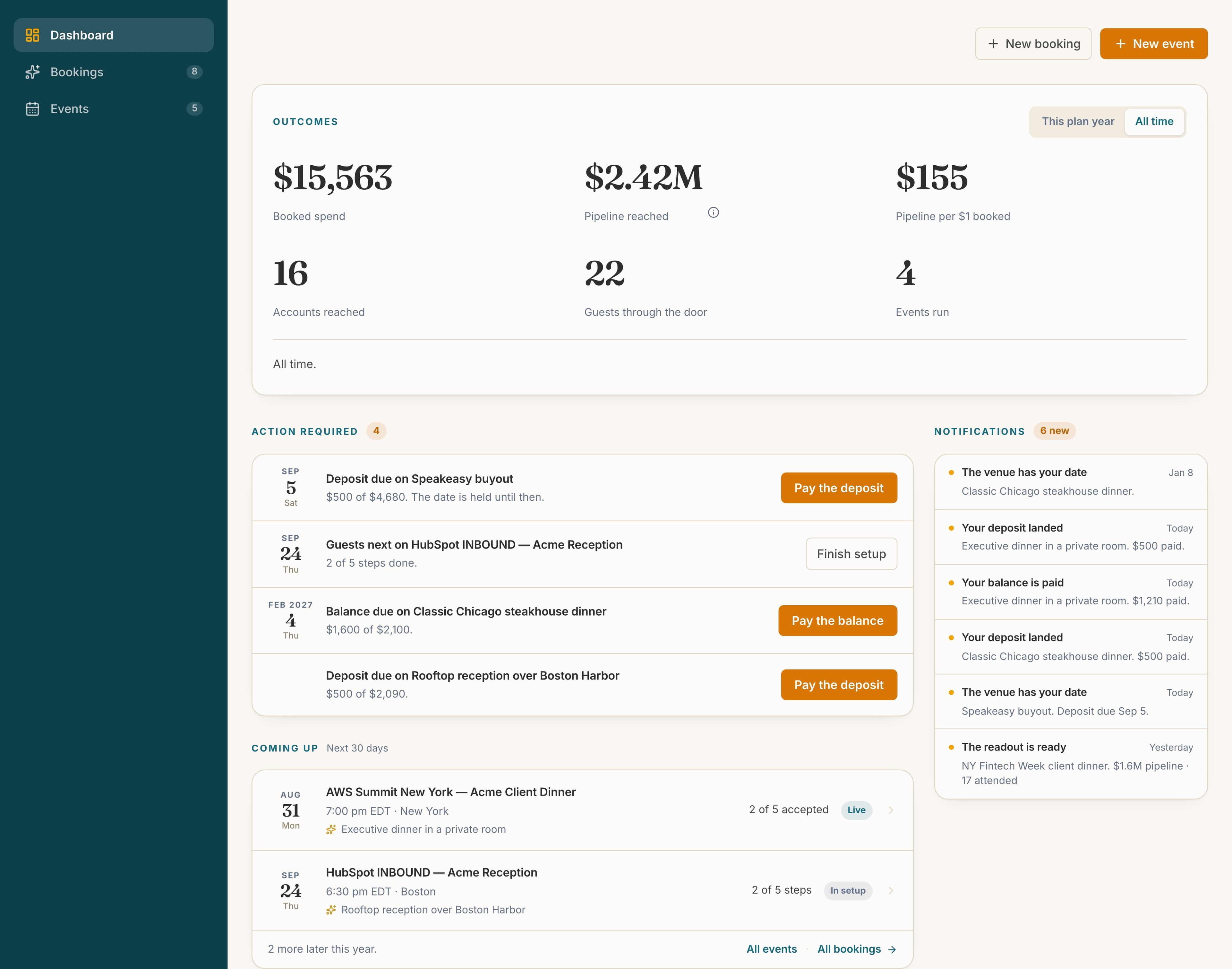
The DayOf portal is home base for your whole program. Every event, guest list, and report lives in one place.
- See every event, current and past, in one dashboard with its status at a glance.
- Give everyone on your team access to a single source of truth for the guest list, RSVP status, and event details.
- Access all of your post-event reports in a single place so you can evaluate your strategy over time.
Your event strategy centralized.
Integrates directly with your AI assistant.
DayOf integrates directly with Claude via MCP. Your team can drive most of their workflow from a Claude conversation.
- Add our MCP server to let your assistant browse the catalog and book directly from your chat threads.
- Use AI as the bridge. Pull from your connected CRM to fill your invite list.
- Pull post-event reports into the chat to analyze trends and evaluate your strategy across conferences.
Hosting an event starts with a prompt.
San Francisco has a deep catalog for Dreamforce week. Here's what fits under $8,000, starting with the experiences that aren't sit-down dinners.
Want me to hold the rooftop for 30 on the Tuesday?
Set up in Claude
Estimated time ~1 minute.
- 1In Claude, click your name, then Settings.
- 2Under Customize, open the Connectors tab.
- 3At the top right, open the Add dropdown and choose Add custom connector.
- 4In the field that says Name, enter
DayOf. - 5In the field that says Remote MCP Server URL, paste this URL.
- 6Click Connect. Sign in to DayOf if asked, then click Approve.
On a Team or Enterprise plan, an owner adds the connector first under Organization settings, then Connectors.
Using Claude Code? Run claude mcp add --transport http dayof https://dayof.travel/api/events/mcp then /mcp to sign in.
Start with a free account.
Browse the catalog, book your first experience, and run your first event on the platform for free.